


Planning Center Services
4.11.84K Reviews
App Specs
- Version
- 6.10.5
- Updated On
- License
- Free
- Downloads
- 1,000,000+
- Developer
- Planning Center
- Categories
- Productivity
- Platform
- Android
Screenshots
 Analysis by AppCompare
I found Planning Center Services most useful when several people need to show up, prepare, and work from the same plan without turning every detail into a long message thread. It is a productivity app from Planning Center, built around service planning and scheduling rather than personal to-do lists. In my experience, that difference matters: the app makes more sense for a church team, volunteer group, or household coordinating a shared responsibility than for someone looking for a general calendar.
A realistic example is a family that regularly helps with a community service. One person may need to know when to arrive, another may need to check what they are responsible for, and someone else may be organizing the whole event. Instead of relying on memory or scattered conversations, the group can use the same planning space. I would not describe it as a family organizer in the usual sense, but it can be useful on a shared device when the people involved already belong to a service team.
How Planning Center Services works in everyday coordination
The strongest part of Planning Center Services is its focus. It is not trying to combine shopping lists, school reminders, private appointments, and household chores into one universal dashboard. Its purpose is narrower: help a team understand what is happening in a service and who is connected to it. That makes the experience more practical when the group has a defined schedule and clear responsibilities.
When I use an app like this, I want answers to simple questions quickly. What is the next service? Am I scheduled? What should I prepare? Who else is involved? A dedicated planning tool is better suited to those questions than a normal phone calendar, because a calendar event usually gives me a time and title but not the surrounding service context. A group chat can contain useful details, yet important information becomes difficult to find after several conversations.
The app is free, which lowers the barrier for volunteers or family members who only need access to participate. It is rated for Everyone, so the age classification is broad and uncomplicated. Still, an age label should not be confused with independence. A younger user may be able to open the app, but an adult or team leader should decide what information that person needs and which account is appropriate.
Why a shared device can work, and where it becomes awkward
On a tablet or phone used by several people, the app can serve as a quick reference point before leaving home. A parent might check the schedule, a teenager might confirm an assignment, and another volunteer might review the same service information later. That shared-device pattern is convenient when everyone understands that the device is being used to access a team account, not as a private personal diary.
The boundary becomes important when people assume that one login represents the whole household. Planning information is connected to individual participation, so a shared device does not automatically make one shared identity a good idea. I would keep each person’s account boundary clear whenever the service setup allows it. That makes responsibility easier to understand and avoids the confusion of one person changing or viewing something under another person’s name.
Worth Reading Before You Choose

EA SPORTS FC Mobile 26 Is a Bigger Football Game, but It Takes Time

Flipboard Shows What News Apps Must Do Beyond the Feed

Switching to Android Auto Means Rethinking Your Driving Routine

Google Calendar Makes a Crowded Week Easier to Manage

Ludo King Makes the Most of the Minutes Between Plans

Baby Panda World Brings Quick Play to Modern Phones, but Its Game Library Feels Busy
This is also why I would not install it simply as a general household planner. If your family wants to coordinate dentist appointments, grocery runs, homework, and vacations, a family calendar or shared task app will probably feel more natural. Planning Center Services becomes the better choice when the household is participating in an organized service and needs to follow that organization’s planning structure.
Setting expectations before inviting everyone
The first useful step is not installing the app; it is agreeing on who manages the plan. A service coordinator, parent, or team leader should be the person who understands the schedule and can explain what each participant is expected to do. Without that ownership, even a well-designed planning app can become another place where people wait for someone else to clarify the details.
I recommend deciding three things early. First, identify the person responsible for maintaining the schedule. Second, tell each participant what the app is for, such as checking assignments or reviewing service details. Third, agree on where urgent changes will be communicated. An app can organize planned information, but a last-minute change may still require a direct conversation or another established channel.
This setup is especially helpful in a household with children or older relatives. The adult can explain the difference between being listed for a service and being personally responsible for remembering every change. A young person may use the app to check what is coming up, while the adult remains responsible for making sure transportation, timing, and preparation are realistic.
I also prefer to begin with one upcoming service rather than trying to understand everything at once. Open the schedule, identify the people involved, and confirm what each person needs to do. That small trial reveals whether the team understands the workflow. If people still ask the same questions in separate messages, the issue may be unclear responsibility rather than a missing app feature.
Coordination is more than seeing a date
The practical value here comes from connecting a service with the people and preparation around it. A conventional calendar is excellent for protecting a time slot, but it often leaves the group to manage roles elsewhere. Planning Center Services is aimed at the part that happens after “the event is on the calendar”: knowing who is expected to participate and how the plan is organized.
For a household, that can reduce repeated reminders. Instead of one person privately remembering everyone’s commitments, each participant has a place to check the shared plan. I find that useful for building better habits. A teenager can learn to look at the schedule before asking what is happening, while a parent can focus on exceptions rather than repeating routine information.
There is a trade-off, though. A focused service-planning app depends on the organization using its planning process consistently. If the schedule is changed informally through messages and the app is not kept current, the app cannot become the single source of truth by itself. My advice is to make one rule explicit: once a change is official, update the planning system or clearly tell everyone which channel replaces it.
Another helpful habit is to check the plan at a predictable time. For example, a family could review the upcoming service together before the weekend, confirm transportation, and note anything that needs preparation. This turns the app from a passive list into part of a routine. It also exposes conflicts early, when there is still time to ask for a change or find another volunteer.
Account boundaries, trust, and age context
Because the app deals with schedules and participation, trust matters as much as convenience. I would avoid handing a shared phone to a child and assuming that the child should manage every part of the account. The safer approach is to give the person only the responsibility they can realistically handle and to keep an adult aware of the overall plan.
The Everyone rating makes the app approachable for a broad audience, but it does not answer household questions about supervision, communication, or privacy. Those decisions belong to the people managing the service. In my view, the app works best when everyone knows why they have access and what they are expected to do with it.
For older family members, the main challenge may be confidence rather than age. A person who is comfortable checking a calendar may still need help understanding service terminology or recognizing where their assignment appears. I would show them the exact routine: open the app, check the next relevant service, confirm their role, and ask the coordinator about anything unclear. A short guided walkthrough is more useful than expecting them to explore every screen alone.
For younger users, I would keep the explanation equally concrete. “Check whether you are scheduled and tell an adult if something looks wrong” is a better instruction than “manage your service commitments.” This keeps the app’s role clear and prevents a child from feeling responsible for decisions that belong to the coordinator.
What stands out after regular use
One non-obvious strength is that the app encourages responsibility to move closer to the person involved. In a typical household, one organized person often becomes the human database for everyone else. A service-focused schedule gives participants a reason to check information themselves. That does not remove the need for leadership, but it can reduce the number of routine questions directed at one person.
A second strength is the distinction between a service plan and a generic appointment. If your group needs more than a date and location, a normal calendar can feel too thin. Planning Center Services is more relevant when preparation, participation, and scheduling belong together. I would choose it over a basic calendar for an organized volunteer rotation, but not for a simple family dinner or one-off appointment.
A third insight is that the app can reveal process problems. If people repeatedly miss assignments, disagree about the current schedule, or depend on private reminders, the issue may be that the group has not agreed on a clear workflow. Using the app consistently can make those gaps visible. That is valuable, although it may feel uncomfortable at first because the tool exposes weak coordination instead of hiding it.
The main friction is the same focus that makes the app useful. Someone who wants a broad personal productivity system may find it too specialized. It is not the app I would choose for managing a full household calendar, tracking personal habits, or collecting unrelated tasks. A general calendar is easier for mixed family events, and a task manager is better when the work matters more than the scheduled service.
I would also be careful about expecting the app to replace human judgment. A schedule can show participation, but it cannot decide whether a child has transportation, whether a volunteer is prepared, or whether a last-minute absence has been handled appropriately. The coordinator still needs to communicate clearly, and household members still need to speak up when circumstances change.
Performance, availability, and long-term fit
Planning Center has maintained this app since its release on September 29, 2010, and the current version is 6.10.2. It supports Android 7.0 and later, which makes it accessible on many older devices as well as newer phones. That is useful for volunteer groups where not everyone upgrades hardware at the same time.
The app has passed one million installs, with an average rating of 4.1 from around 8.8 thousand ratings and around 1.8 thousand written reviews. Those figures suggest a substantial user base and a generally positive reception, but I would still treat them as context rather than a guarantee. The right question is whether your organization actually uses Planning Center for its service workflow.
The fact that it is free is particularly helpful for a group with many participants. No one has to decide whether a casual volunteer should pay for a scheduling tool. That said, free access does not remove the need for an organized setup. If the leadership team does not maintain the plan, participants may experience the app as incomplete even though the underlying concept is sound.
Before choosing it for a household, I would ask whether the household is joining an existing Planning Center process. If the answer is yes, using the same system is usually more sensible than creating a parallel family spreadsheet. If the answer is no, installing it first may not solve anything, because the app’s usefulness depends on a service structure rather than isolated individual planning.
Who should use it and who should skip it
I recommend it to families who volunteer together, teams that need a shared service schedule, and individuals who want a direct way to check their participation without searching through messages. It is also a good fit for a household where one person coordinates many recurring commitments and wants others to take more responsibility for checking the plan.
I would skip it if you only need a private calendar, a shopping list, or a general task manager. I would also hesitate if your group refuses to agree on one official schedule. In that situation, a simpler communication method may actually be clearer until the organization is ready to maintain a structured plan.
If your family includes several age groups, I would use it with clear account boundaries and a simple weekly checking routine. Let adults handle planning decisions, let children and teenagers check the parts relevant to them, and make sure everyone knows where urgent changes will appear. That approach respects both independence and supervision without pretending the app can provide household rules on its own.
My household verdict
After looking at it as both a service tool and a shared-device app, I see Planning Center Services as a focused solution rather than a universal organizer. Its value appears when a real service schedule already exists and people need a dependable way to understand their involvement. For that situation, I like the emphasis on coordination and personal responsibility.
My final recommendation is simple: use it when your church or service team already relies on Planning Center, then build a small household routine around it. Check the next service together, confirm who is involved, and keep account responsibilities clear. If you are searching for an all-purpose family planner, choose a broader alternative instead. Its best quality is not that it organizes everything, but that it keeps one important kind of shared commitment easier to follow.
Pros
- Excellent for coordinating volunteers
- schedules
- and service plans.
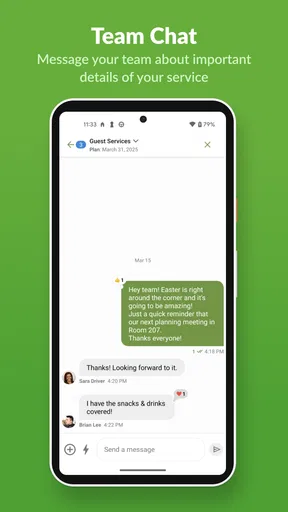
- Clear team communication helps reduce last-minute confusion.
- Supports multiple campuses
- services
- and ministry teams.
- Mobile access makes schedule updates convenient on the go.
- Integrates well with other Planning Center ministry tools.
Cons
- Some features require separate paid Planning Center subscriptions.
- The interface can feel complex for first-time users.
- Push notifications may become overwhelming for active volunteers.
- Limited usefulness for churches not using Planning Center already.
- Certain administrative tasks are easier on the web than mobile.
FAQs for Planning Center Services
What is Planning Center Services used for?
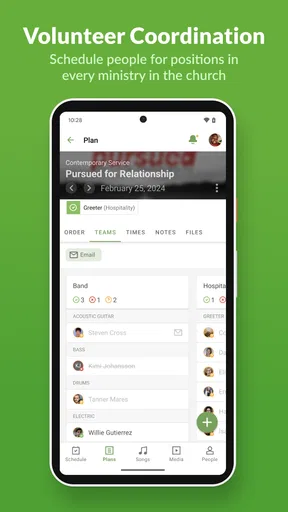
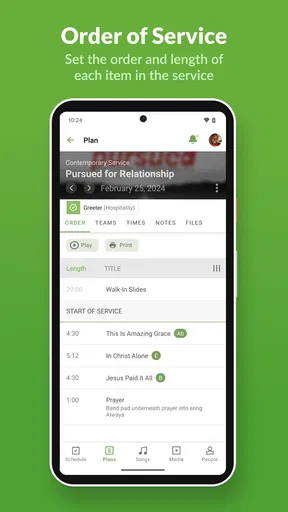
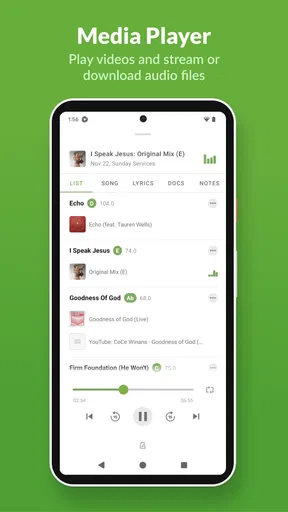
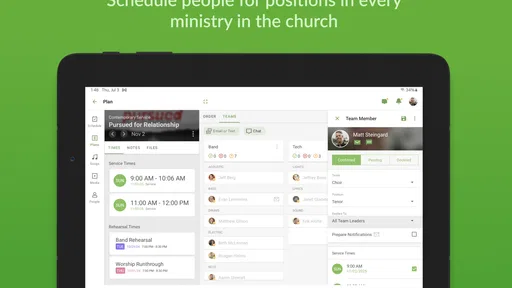
Planning Center Services is a worship planning and scheduling app designed for churches and ministry teams. It helps organize service plans, assign volunteers, manage song and media details, share files, and communicate updates. Team members can review their responsibilities, confirm availability, and access the information needed before and during a church service.
Can volunteers use Planning Center Services without an administrator account?
Yes, volunteers can use Planning Center Services after being invited or scheduled by their church or organization. They generally sign in with their own Planning Center account and can view assigned positions, service times, plan details, files, and messages. The information available depends on the permissions and settings configured by the church administrator.
Does Planning Center Services work on Android and iOS devices?
Planning Center Services is available for both Android and iOS devices, allowing ministry members to stay updated from most modern smartphones and tablets. After installation, users can log in to their Planning Center account and access their schedules and service information. Some features may also be available through a web browser.
Can Planning Center Services manage volunteer schedules and availability?
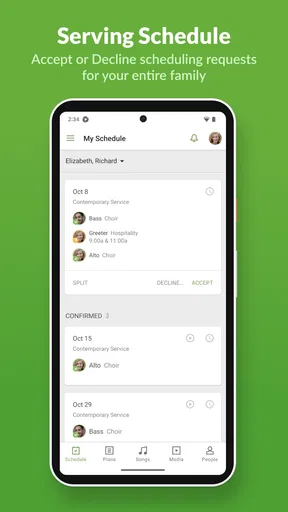
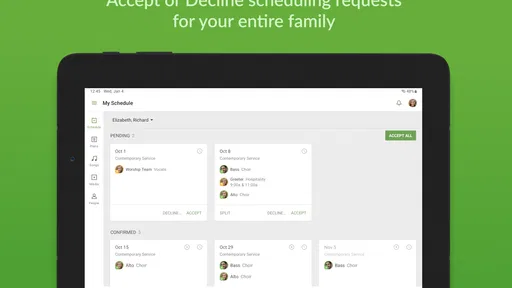
Yes, scheduling is one of the app’s main functions. Administrators can create teams, assign people to positions, send scheduling requests, and manage service dates. Volunteers may be able to accept or decline requests, mark unavailable dates, and review upcoming assignments. The exact options depend on the church’s Planning Center subscription and configuration.
Is Planning Center Services free to download and use?
The app can generally be downloaded without paying an upfront installation fee, but access to its features depends on the church or organization using Planning Center. Planning Center offers subscription-based services for administrators, while individual volunteers typically do not purchase a separate plan. Your church may need an active account and must invite you before you can use it.


